Now Hearing This

I added a sidebar to the front page here at onfocus that shows the last few albums (with cover art) I've listened to in iTunes. Let's skip why I might want to do this for now, and just jump into the how. People have been doing this since MP3 players have existed, and there are several services that can do this for you now. I send my tracks to Last.fm, and there's My Strands—both of these services have HTML snippets you can add to your site that will show some aspect of what you're listening to. Last.fm is great at putting together charts of tracks and artists, but does nothing with albums. So I had to code my own "now listening" widget to show recent albums. Here's how it works in case anyone out there wants to do something similar:
On My Server
My server has a Perl CGI script called getAlbum.cgi that accepts an artist and album name. Once getAlbum receives an artist and album, it searches for a match on Amazon via their API. If a match is found, it puts a little HTML together with the details, adds the album to a local HTML file: now-hearing.html, and removes the last entry. I include the file in my weblog, and that's what you see in the sidebar.
On My PC
With the server script in place, I just needed a little glue between the server and iTunes. A Windows script called now-playing.vbs checks to see if iTunes is open and playing, and then sends the current artist and album to the server. I set the script to run every 20 minutes with the Windows Task Scheduler. It doesn't grab everything that's playing (especially if I'm shuffling around), but it gets pretty close.
On My Mac
I use more than one computer, so I didn't want my Mac to be left behind. I set up an AppleScript that basically does the same thing as the PC script. Instead of using an outside process to run the script at regular intervals, I used the AppleScript idle handler to hit the server every 20 minutes. Then I set the script to open when I log in.
Here's the Code
If you want to try this setup, you can grab the code: You'll need to edit the scripts a bit so they're pointing to your version of getAlbum.cgi on your server, but that's about it. These scripts are working well for me, and they didn't take very long to put together. And hey, who else is going to play Toots and the Maytals back to back with Ladytron? These types of idiosyncrasies need to be put on display!
  • you can get the best of the web at mathowie's community blog (excepting pancakes)
    filed under: music, mp3, joke
  • "To investigate more formally, I purchased some time on a computer cluster and downloaded a copy of the Wikipedia archives. I wrote a little program to go through each edit and count how much of it remained in the latest version..."
    filed under: wikipedia, statistics

Show and Tell: Firefox Extensions

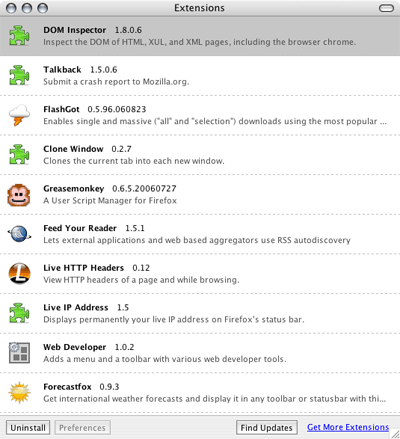
Just set up a new instance of Firefox, and I had to figure out which extensions I couldn't live without. Here's a screenshot of the list:

Firefox extensions

And here are the details:
  • Dom Inspector and Talkback are installed by default.
  • FlashGot - sends large files to a download manager like ReGet (PC) or iGetter (Mac).
  • Clone Window - When you open a new tab or window you'll get the current URL instead of a blank page.
  • Greasemonkey - Does anyone not have Greasemonkey installed? If I could only have one extension, this would be it. It customizes websites with user scripts.
  • Feed Your Reader - Makes that orange feed icon in the address bar actually useful. I use it to subscribe to feeds at Bloglines.
  • Live HTTP Headers - Useful for debugging web stuff. I don't often need the full power of Ethereal, so this extension will give me a look at the headers without the hassle.
  • Live IP Address - I want to know what my IP address is. I'm a geek.
  • Web Developer - This extension does a bunch of stuff, but I've found I use the no-cookies and no-CSS toggles most often.
  • Forecastfox - I use it to show the current weather conditions in the lower-right corner because I don't get outside much. ;) The severe weather alerts are also handy.
Any extensions you can't live without?
  • looks better than parallels for running a single Windows app on OSX. (though I can't get this beta version to run.)
    filed under: mac, software, productivity
  • Marc Hedlund just started a blog for his personal finance startup
    filed under: weblogs, economics
I'm going to start pulling my del.icio.us links in as a post like the cool kids do. Here are the links from yesterday to kick things off...

New onfocus design, finally

I redesigned onfocus in March 2002. Since then, I haven't touched the design except for a few tweaks here and there. This site was way past due for a change, and this is the new look. If you're reading this in your newsreader, you'll have to click to see the new onfocus design in red, white, and black. I still have to work on the sub-pages, but I thought getting the weblog moved over would be a good start.

Time in a Bottle

Keeping track of the hours I work for clients has always been a hassle. My standard method was Notepad. Yep, it's sad, but I have a folder for each of my projects—along with a text file full of notes about that project. And I used to jot the amount of time I spent on the project somewhere in the file. Typically I'd have a [date] - [hours] notation, and when it was time to invoice I'd have to go back through emails to find out what those hours were spent doing. Sloppy.

I've tried using time-tracking software. Earlier this year in a fit of organizational desperation I put all of my projects and hours into a program called Timesheets Lite. It tracked hours alright, but trying to get at those hours at the end of the month was a nightmare. I could get an invoice once, but then the hours were "reconciled" and trapped in a database somewhere inside the program. Sure the software had a bunch of "features" like invoicing and reporting, but I like my manual invoicing system fine. And that's what I've found with all of the software I've tried for tracking hours: it provides an entire "workflow solution" rather than a simple way to track hours.

When I stepped back, I realized that all I needed was a stopwatch with a log. I wanted a big green button for go, a big red button for stop, a way to choose which project I'm working on, and list of all my work sessions. So I spent a few non-billable hours coding my own stopwatch, and I thought I'd share it here. It's nothing fancy: no invoicing, no reports, no charts, no to-do lists. Just a simple timer + some notes.

And it's in ASP classic just to make it even less useful. ;) But if you have a Windows server with SQL Server and want your own time-logger, here's how to build it:
  1. Create the database. It's two tables, hours and projects:
    CREATE TABLE time_hours (
    	sessionID int IDENTITY (1, 1) NOT NULL ,
    	projectID int NULL ,
    	startTime datetime NULL ,
    	endTime datetime NULL ,
    	Notes varchar (255) NULL 
    )
    
    CREATE TABLE time_projects (
    	projectID int IDENTITY (1, 1) NOT NULL ,
    	projectName varchar (50) NULL ,
    	projectRate int NULL 
    )
  2. Grab this script: trackhours.asp (Change extension to .asp.)
  3. Add your database details to the top of the script.
  4. Open the script at your server in a web browser, create a project, click Start Timing.
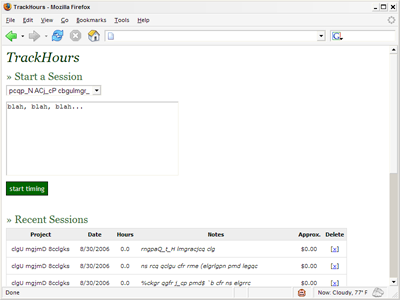
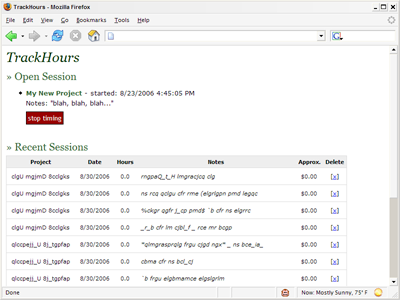
I can add notes to every session, and then go back and edit those notes by clicking on them once the session is finished. (Handy for noting what I actually did vs. what I set out to do.) I can create a new project by choosing "Create New Project" from the drop-down, which gives me a few extra form fields for project name and hourly rate. There's no way to delete a project, but I haven't needed that yet. There's just one session open at a time, and when I'm done working I just click the big red button and that session is added to the top of the list. There's a list at the bottom of the page showing the last 20 sessions or so. In action the script looks like this:

TrackHours screenshot
starting a session

TrackHours screenshot
session in progress

(The data has been garbled to protect the innocent.)

I figured someone else out there might not want to burn the few hours it takes to put this together. I've been using this script for just over a month, and so far it's fantastic. I have a running log of how I've been spending my days, and an estimate of how much I'm making during the week. I'm finally feeling organized when it comes to tracking hours. And since I've been freelancing for about five years, it's about time.

Bridge Pedal

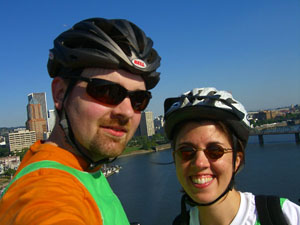
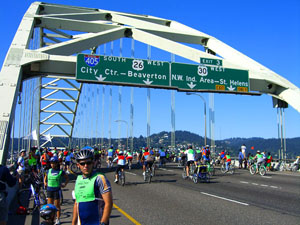
The Bridge Pedal this weekend was quite a spectacle. It's amazing the city of Portland can pull it off—they close or limit traffic on 10 bridges that connect the two sides of Portland. Part of the interstate is blocked off, and 15,000+ bikers take to the streets to enjoy it. Frank over at Bike Hugger mentioned that it's one of the largest bike events in the country. Here's sk and I in full biking regalia on one of the bridges:

bp_pb_sk.jpg

(I'm not angry here, just holding the camera funny and couldn't find the button.)

There was a band playing at the top of two of the bridges, and REI had "bike tech" stations everywhere to help people fix any problems along the way. (One REI guy helped me fix a front brake that was sticking.) It was a highly organized, very well-run event. It didn't hurt that the weather was perfect.

Even though the ride was festive, and people were nice, it was a bit dangerous. We saw a woman fly over her handlebars landing face-first on a bridge after someone in front her stopped in the middle of the road. And we saw paramedics in a few other places helping out after crashes. You really had to keep moving and be aware of everyone around you to avoid running into people. My only critique of the event is that they should provide a bit more safety instruction to the riders.

But even with the stress of riding with a large pack, it beats sharing the road with cars. Here's a look at the top of our last car-free bridge of the day:

bp_fremont.jpg

Getting up to the top of a few of the bridges was a lot of work for us novice bikers, but I felt like we had a really good ride. We're both tired today, but there were no injuries, no major soreness, and a good time was had by both! I have a few more pictures at Flickr tagged Bridge Pedal. And then there's the global Flickr tag Bridge Pedal. And you can also check out other Oregon blog posts that mention Bridge Pedal via ORblogs.

Update: Check out this picture of the Fremont Bridge over at Portland Ground.
« Older posts  ’  Newer posts »