My Road to Google Hacks

I'm happy to announce that the new edition of Google Hacks has been released into the wild. I started working on Google Hacks, 3rd Edition earlier this year and now it's finally hitting the shelves. I had the fun task of contributing a slew of brand new hacks to the book, updating existing hacks, and tweaking the structure of the book to bring it up to date. Rael and Tara had already put together two editions of Google Hacks that were fantastic, and I'm glad to be in their company by bringing the book up to date.

Working on Google Hacks has brought me full circle on my personal Hacks Series adventure. In April, 2002—shortly after Google announced their Search API—I put together Google Smackdown to try out the API. I didn't think of the Smackdown as a hack per se, but a few months later I got an email from Tara asking if I'd like to contribute the code to a book about Google. I added some comments to my code, passed it on to her, and that was my first contribution to the Hacks Series. It turns out the Smackdown is a hack, and I'd been hacking applications together for quite a while.

Since then I've contributed three books to the series, one with co-author Jim Bumgardner (Flickr Hacks). In the process I even came up with my own method for writing hacks for the series: How I Write a Hack. The chance to work on Google Hacks brought me back to my first contribution, and if I remember correctly, the first book in the series.

The second edition of Google Hacks came out toward the end of 2004, and nothing's really been happening at Google since then. ;) There was a lot to cover, and this new edition tackles hacking Google Maps, covers working with blogs and Blogger in more detail, and covers tinkering with a host of other new Google applications such as Google Video Search, Google Talk, Google Reader, Google Personlized Search, Google Analytics, and on and on. I also added information throughout about protecting your privacy, and I hope it helps readers understand the trade-off we all make between convenience and sharing personal information with a large company. I found there's an art to keeping up with news about Google, so I included an Appendix of sources you can tune into to stay on top of Google's moves. And of course the book still provides a complete reference to squeezing the most out of Google's Search Syntax, Gmail, tuning your site for Google, their Search API, their desktop tools, and a bunch of fun tricks and games (like the Smackdown) that people have built to customize Google or generally mess around. shew!

I received my copy of the book a couple days ago:
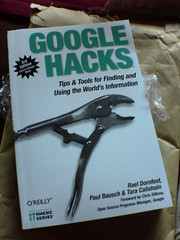
Google Hacks, 3rd Edition

And it's satisfying to see the end result. You should be able to get your copy at bookstores everywhere now. To preview some of the new stuff, check out O'Reilly's page for the book: Google Hacks, 3rd Edition. You'll find a Table of Contents there, and five sample hacks. Happy Google Hacking!

Update: Here's O'Reilly's press release about the book: The World According to Google.
Yahoo! Hacks Video

Molly Wood (hooray for!) over at CNet took some tips from Yahoo! Hacks, and made a four minute video pointing out some Yahoo! Search tips: Video: Yahoo hacks.

OSCON Wednesday 2

Just for some OSCON closure...I enjoyed the rest of the day. Michael's talk convinced me that I should be looking into this whole "Ruby on Rails" thing, it's impressive what he's put together (llor.nu, unroll backwards) with Rails and Scriptaculous. He mentioned that he barely knew JavaScript, but was able to put together the highly interactive interface for the game thanks to existing libraries.

I saw a demo of the Google Ajax Search API, and got a better feel for that. It's definitely buzzword compliant, but I'm not convinced it improves over the standard Google API beyond the perceived response time. I personally wish Google would put as much effort into expanding their existing Search APIs, rather than delivering the same data in a new, souped-up way.

The rest of the day I was on the "Six Apart" track. Artur Bergman lead a session about 6A's infrastructure. Lots of talk about load-balancing, caching, and managing servers ensued. Then 6A-er Tatsuhiko Miyagawa demoed his project Plagger—an RSS/Atom slicer and dicer. It does a ton of cool stuff, but it looks hard to install. I need to play around with it.

I didn't make it to the community sessions I was talking about, but I had fun peering into windows on tech worlds outside of my normal experience.

OSCON Wednesday

I'm blogging live from the Portland Convention Center where OSCON 2006 is well underway. After attending Webvisions last week, it's amazing to see a conference that is several orders of magnitude bigger. Instead of a few hundred people spanning a handful of conference rooms, OSCON feels like thousands of people spanning dozens of rooms. (Don't quote me on the numbers.)

It's always great to hear Tim O'Reilly talk about what he's thinking about. He listed five ideas related to open source that are designed to provoke the audience:
  1. Architecture of Participation
  2. Open Source Licenses Are Obsolete
  3. Asymmetric Competition
  4. Operations as Advantage
  5. End of Open Data
Out of context, these probably don't mean much. But I've added them here for my own benefit. And he included a couple of quotes that I'd like to remember: "When the best leader leads, the people say, 'We did it ourselves.'" -Lao Tzu, and "In the future, 'being on someone's platform' will mean being hosted on their infrastructure." - Debra Chrapaty, VP Windows Live.

Anil had a keynote this morning as well, and he talked about making meaningful applications to help people connect. He also talked about the open source Six Apart developer tools for building scalable web apps. He mentioned that most of the applications we think about when we think Web 2.0 are using at least some of the tools. I didn't realize how widely they were used.

Conference organizer Nat talked about a new focus on talks about community at OSCON—one of my primary areas of interest. And there are a bunch of sessions today that aren't specifically about coding that I'd like to see.

I'm in Michael Buffington's talk about games with Rails now...

Webvisions Day 1

Webvisions was fun for me because I know most of today's speakers. And it was great to hang out and chat with friends, and meet some new folks.

The day started with Matt talking about making money with blogging. His recipe was simple: find something you're passionate about, write quality stuff, and an audience and money will follow. The section that stuck out to me was his post "templates" for generating content: product reviews, interviews, op-ed vs. news, and mining hard-to-use forums for good bits of information.

The blogginess continued with a Practical Business Blogging roundtable, where there were good stories about blog culture clashing and melding with the corporate world.

I had lunch with Oregon bloggers and pals with almost the same lineup as last year. With the "pals" being the guys behind Daily Ping. (It turns out I'd met Ryan several years ago at Web2000 in San Francisco.) It's great to meet people face to face for some eyeball contact when you only interact online.

And speaking of meeting up, Andy's afternoon presentation about virtual communities meeting offline was fantastic. It was a history lesson in virtual groups coming together in meatspace—from ham radio guys to BBSers to Metafilter meet-ups to Meetup.com. He proposed a three component system necessary for virtual groups to assemble in real space: 1. Personal identity development, 2. Group identification, 3. A commons (or virtual backroom) for organization. His barrage of group pictures of all types of people meeting for all types of things were fascinating.

The day ended with Derek talking about distributed communities. He was kind to mention ORblogs as an example of a new type of "connective tissue" that helps visualize distributed communities. I like his "company town" analogy for describing centralized services, and I agree that in the long run completely distributed "suburbs" with "home owners" will be more stable than having a few large company towns. If these analogies don't make sense out of context, keep an eye out for a podcast of the talk. (Or check out this earlier version of the talk he gave at Etech: The New Community.)

All in all, great sessions, great hallway conversations, and a very casual day of thinking about some of my favorite topics. Thanks, Webvisions!

Webvisions

For the next few days I'll be in PDX, that city of Roses—Stumptown, Bridgetown, Little Beirut, last affordable city on the West Coast, also known as Portland, Oregon—where I'll be having visions. Of the Web. At Webvisions. If you'll be there too and want to talk about envisioning the Web, drop a line.

Oh, and to read what Oregon bloggers are saying about the conference in their backyard, tune in to Topic: Webvisions at ORblogs.

Update: I'll also be in Portland a week from today for OSCON—it's conference mania around here. Ditto on the line-dropping for next week. And ditto for Topic: OSCON.

A Slice of the Blogosphere

The Oregon weblogs site I run (ORblogs) is watching a tiny slice of the blogosphere. The site is currently tracking 1,051 active weblogs, and that number is made up of weblogs by people who choose to participate at the site. (And there are currently 48.3 million weblogs, according to Technorati.) ORblogs tracks a bunch of metadata from these 1,000+ participating blogs, with most of the data exposed in various ways across the site. However there are a few bits of data that you don't see on the site, and I think it's interesting to run some numbers and share them once in a while.

One bit of data collected from RSS feeds is the generator. If you look at the source XML of most RSS or Atom feeds, you'll often see a generator or admin:generatorAgent tag. And because weblog authors usually don't touch their feed templates—if they have access to their feed design at all—this tag is a fairly good way to see which weblog tool was used to generate any given weblog.

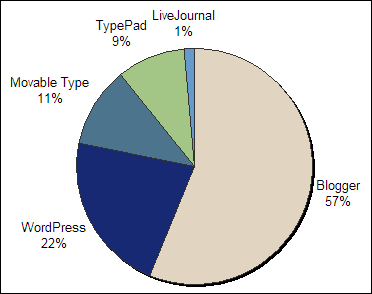
Without further explanation, here's weblog tool usage across Oregon weblogs flowing through ORblogs:
  1. Blogger: 431
  2. WordPress: 167
  3. Movable Type: 87
  4. TypePad: 72
  5. LiveJournal: 11
And to show off my Excel charting skills, here's a pie graph of this data:

generator pie chart

But wait! That doesn't add up to 1,051. True, of the total active weblogs, 70 don't have a feed associated with their listing. (Typically because their weblog HTML is missing an auto-discovery tag, or the tag contains a bad URL.) And of the rest that do have a feed associated with their listing, 173 feeds didn't have a generator listed. The rest were generators that numbered four or fewer such as Microsoft Spaces, and PMachine.

"What about FeedBurner?", you cry. ORblogs is tracking that usage too, and luckily FeedBurner passes the original generator information through in its feeds. Of these blogs, 55 were using FeedBurner.

Another interesting bit of data typically stored in these generator tags is a version number for the software. Here's how some of the version numbers break down (when a version number was available):

Blogger (who knew they had versions?):
  1. Blogger 6.72: 344
  2. Blogger 5.15: 76
WordPress:
  1. WordPress 2.0.3: 33
  2. WordPress 2.0.2: 28
  3. WordPress 1.5.2: 22
  4. WordPress 2.0.1: 18
  5. WordPress 1.5.1.3: 11
  6. WordPress 2: 9
  7. WordPress 1.5: 8
  8. WordPress MU: 7
Movable Type:
  1. Movable Type 3.2: 52
  2. Movable Type 3.121: 5
  3. Movable Type 3.17: 5
  4. Movable Type 2.63: 4
  5. Movable Type 2.64: 4
  6. Movable Type 2.661: 4
  7. Movable Type 3.15: 4
TypePad had a few different version numbers (1.0 and 1.5.1), but most often simply listed 'TypePad' or 'http://www.typepad.com/' as the generator. LiveJournal was LiveJournal, no version.

And that's what's happening with a slice of the Oregon blogosphere as of July 14th, 2006.

Update: And for fun, here's a similar survey I ran using the HTML generator tag in 2004 back when ORblogs was tracking just 309 weblogs: ORblogs Forum: Weblog Tool Survey. Blogger and Movable Type were tied back then.

Linux Code Editors

In case you missed the comments on my recent Ubuntu post—Linux These Days—the mob is helping me pick out a Linux code editor. Thanks, mob! For fun, here are the suggested editors I'm going to take a look at: jEdit was recommended several times, and emacs was mentioned a few times. I appreciate the help, thanks again everyone.

Beavs Win!

I'm not a big sports fan, and to be honest I didn't watch a single Beavers baseball game this year until last night. But it's fun to see the hometown team succeed on the national stage: OSU wins College World Series. Go Beavs!

Update: The big news around here is that this mob-loving town of 50,000 didn't erupt into an orgy of violence after the win: No Riots After Win.

Linux These Days

I've been flirting with Linux as a desktop OS on and off over the years, but I've never made a commitment. I'd install Linux on an old machine, but then I'd hit some stumbling block and the machine would sit in the corner gathering dust. A big part of the problem was the interface. Years ago the graphical interface part of Linux didn't ever feel right. The fonts were odd, the Web browsers (even Netscape) rendered pages in strange ways, and the menus were clunky. Not to mention the nightmare of finding drivers for your specific hardware. So I've never really had a Linux machine around the house for testing Web pages, surfing, and writing email.

A couple weeks ago I put Revolution OS into my Netflix queue, and relived the early days of Linux. I even paused and slow-mo'd through the Linux World '99 crowd shots, hoping I'd catch a glimpse of my younger self. (I was there, but not caught on film.) The movie was made in 2001, and the punchline is that it ends with Linux companies like Red Hat storming the stock market, future unlimited—with only a brief mention of the crash that followed in text at the very end.

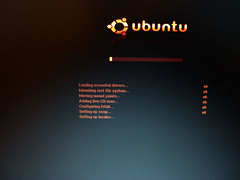
Anyway, the movie prompted me to give Linux a try again. After looking around for a bit, I decided to try out Ubuntu on a Dell Inspiron I'd abandonded for a Powerbook. Ubuntu is a night and day difference from my earlier Linux experiences. It was simple to install, looks good, and comes with Firefox. (I think they actually had some designers working on the interface. No offense, engineers.) I even popped in a wireless card and it just worked! (Thanks, engineers.) I didn't have to go searching for drivers, or edit obscure text files with cryptic settings. The interface still felt a bit odd to me, but I followed this tutorial—HOWTO: Hoary ClearType-like fonts—and suddenly the interface looked very familiar. (Alas, some cryptic text editing is required.)

ubuntu

I'm not going to give up my Powerbook in favor of my new Linux laptop yet. But I'm amazed at how far Linux has come in a few years. I still need to find a good code editor and office-type programs, which might ultimately be the next stumbling block. At least I finally have a Linux machine that's usable, and more importantly, feels like the computer interface I'm used to.

Secure Google Calendar

A while back I posted that I switched to Google Calendar for managing my schedule, and I showed how I dumped a batch of dates into a calendar to get started: Add a batch of dates to Google Calendar. I've been using it every day now for two months, and it simply blows away every other online calendar I've used. I'm sharing dates and times with sk, keeping track of project milestones, birthdays, and holidays all in one space.

With all of this personal data flying around, I think it's important to use a secure connection when I connect to Google Calendar. Google offers an SSL connection, but they don't encourage it. In fact, even if you change your Google Calendar bookmark URL to https, you'll often be redirected to a plain old http connection. boo, Google! That's why I've found Mark Pilgrim's GMail Secure Greasemonkey script invaluable. It's built to force a secure connection for GMail, but the script itself is so generic that it works for other sites. Here's how to get the script working with Google Calendar:
  1. Install GMail Secure
  2. Choose Tools -> Manage User Scripts... from the Firefox menu
  3. Highlight GMailSecure, and click Add next to Included Pages
  4. Add two entries:

    http://google.com/calendar*
    http://www.google.com/calendar*

  5. Click OK to close
With this script installed, I know my connection with Google Calendar will be secure no matter how I get there. (And as a bonus, my GMail account is secured as well.) Sure, Google knows where I'll be at all times, but at least no one in the middle will.

Better Amazon RSS Feeds

A few years ago I put together a little tool to help assemble RSS feeds of Amazon products called the Amazon RSS Feed-Builder. I've been using feeds generated with this tool for about three years, tracking the latest books, music, and DVDs across series and artists that I like. Because publishers often announce books to Amazon well in advance, I know about new books in the Hacks Series well before O'Reilly announces the books on their own website. Amazon also offers pre-built feeds on their Amazon Syndication page.

These old-style Amazon feeds have worked well at alerting me about new products, but they are fairly limited. I just see the title, the author, and a price in my newsreader. I decided to upgrade my Amazon feeds so each item includes a product image (if available), a product description, and product details. And I figured if I was going to go through the trouble of upgrading my feeds, why not just upgrade the Amazon RSS Feed-Builder? So here's the new thing:

Amazon Feed Generator

It's hot off the assembly line today, and I'm sure there are bugs to be worked out. (It's also powered by orange gradients.) If you want to give it a shot, feel free to try it out and post any comments/problems on this post. As an example, here are the latest books in a Polar Exploration Feed. I subscribe to this feed, and I'm notified whenever new books about polar exploration show up in Amazon's catalog.

This uses the latest version of Amazon Web Services, with a custom stylesheet and Amazon's server-side XSLT service. And I want to say thanks to Alan Taylor for his recent article subtitled, AMZN-XSLT-JSON-AJAX (AXJA?). His stylesheet is a perfect example of consuming the new, more-complex AWS responses with XSL.
« Older posts  ’  Newer posts »